Friday, July 15, 2022

[Gitlab] HOW TO USE SPECIFIC RUNNERS IN GITLAB CI/CD PIPELINE

What are Gitlab Runners?

GitLab Runner is an application that works with GitLab CI/CD to run jobs in a pipeline. They can also run
inside a Docker container or be deployed into a Kubernetes cluster.
Types of Runners:
  • Shared Runner: These types of runners are available globally and can automatically be allocated based on their availability.
  • Specific Runner: For this, you have to register a runner and you can only use it in a specific project or can also use it in a specific stage of your pipeline. Will discuss this more in detail.
  • Group Runner: These runners are shared across projects in the group.

How to register a specific runner?
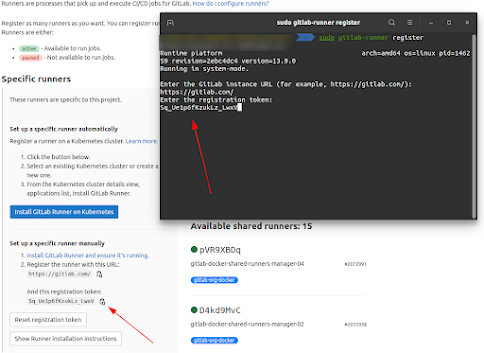

sudo gitlab-runner register

This command will start the process of registering a runner. Then go to the Gitlab Project -Settings->CI/CD->Runners and copy the URL of specific runners.

How to use this specific runner in a pipeline?

Just add the tags field in your pipeline and name the tag which you added during the registration of a runner.
Here is the sample pipeline for your reference.
stage: test
script:
- echo "Testing"
- test -f "build/info.txt"
tags:
- testing
npm:
image: node:latest
stage: npm
How to use this specific runner in a pipeline?
script:
- echo "image pulled"


Monday, July 11, 2022

[Gitlab] gitlab runner doesn`t work on a specific project


Ref: gitlab runner doesn`t work on a specific project

Error:
Fetching changes with git depth set to 50...
fatal: remote origin already exists.
fatal: git fetch-pack: expected shallow list
ERROR: Job failed: exit status 1

Solution:

Centos 7 ships with git version 1.8.3.1 . This version doesn't support commands like git fetch-pack . To fix this problem, you could update git on your server from the IUS repository. update git on Centos 7 to version 2 from third-party IUS repo

$ git --version
git version 1.8.3.1
sudo yum -y install https://packages.endpointdev.com/rhel/7/os/x86_64/endpoint-repo.x86_64.rpm
sudo yum install git


[Gitlab] Install gitlab runner


Ref:https://docs.gitlab.com/runner/install/linux-manually.html

Download

To download the appropriate package for your system:

  1. Find the latest file name and options at https://gitlab-runner-downloads.s3.amazonaws.com/latest/index.html.
  2. Choose a version and download a binary, as described in the documentation for downloading any other tagged releases for bleeding edge GitLab Runner releases.

For example, for Debian or Ubuntu:

curl -LJO "https://gitlab-runner-downloads.s3.amazonaws.com/latest/deb/gitlab-runner_${arch}.deb"

For example, for CentOS or Red Hat Enterprise Linux:

curl -LJO "https://gitlab-runner-downloads.s3.amazonaws.com/latest/rpm/gitlab-runner_${arch}.rpm"

For example, for FIPS compliant GitLab Runner on RHEL:

curl -LJO "https://gitlab-runner-downloads.s3.amazonaws.com/latest/rpm/gitlab-runner_amd64-fips.rpm"

Install

  1. Install the package for your system as follows.

    For example, for Debian or Ubuntu:
    dpkg -i gitlab-runner_<arch>.deb For example, for CentOS or Red Hat Enterprise Linux:
    rpm -i gitlab-runner_<arch>.rpm

  2. Register a runner

Update

Download the latest package for your system then upgrade as follows:

For example, for Debian or Ubuntu:

dpkg -i gitlab-runner_<arch>.deb

For example, for CentOS or Red Hat Enterprise Linux:
rpm -Uvh gitlab-runner_<arch>.rpm

Sunday, July 10, 2022

[Report Server] fully share files

Ref: https://reportserver.net/en/guides/admin/chapters/File-System/

 To fully share files you may place them in a folder where a tick is set at Share folder for web access.


Install and use xorg-server on macOS via Homebrew

  The instructions to install and use xorg-server on macOS via Homebrew: Install Homebrew (if you haven't already): /bin/bash -c ...