Thursday, March 13, 2025

Install and use xorg-server on macOS via Homebrew


The instructions to install and use xorg-server on macOS via Homebrew:

  1. Install Homebrew (if you haven't already):
   /bin/bash -c "$(curl -fsSL https://raw.githubusercontent.com/Homebrew/install/HEAD/install.sh)"
  1. Install xorg-server:
   brew install xorg-server
  1. Install xinit (to start the X server):
   brew install xinit
  1. Start the X server:
   startx

Thursday, December 5, 2024

DBeaver Mysql dump problem

DBeaver Mysql dump problem 

2059: Authentication plugin 'mysql_native_password' cannot be loaded

My temporary solution was downgrading to version 8.4:
brew install mysql-client@8.4
Ref: https://github.com/Homebrew/homebrew-core/issues/180498 


Tuesday, September 17, 2024

[macOS] import cer and trust root cer


 security add-trusted-cert -r trustRoot -k  ~/Library/Keychains/login.keychain file.pem   

Monday, June 24, 2024

[macOS] Git File Locking


Install Git LFS


Before getting started, make sure you have Git LFS installed in your computer. Open a terminal window and run:

git-lfs --version


If it doesn’t recognize this command, you must install it. There are several installation methods that you can choose according to your OS. To install it with Homebrew:

brew install git-lfs


Once installed, open your local repository in a terminal window and install Git LFS in your repository. If you’re sure that LFS is already installed, you can skip this step. If you’re unsure, re-installing it does no harm:

git lfs install

For more information, see Git Large File Storage (LFS).

Lock files

By locking a file, you verify that no one else is editing it, and prevent anyone else from editing the file until you’re done. On the other hand, when you unlock a file, you communicate that you’ve finished editing and allow other people to edit it.

To lock or unlock a file with Exclusive File Locking, open a terminal window in your repository directory and run the commands as described below.

To lock a file:

git lfs lock path/to/file.png


To unlock a file:

git lfs unlock path/to/file.png


You can also unlock by file ID (given by LFS when you view locked files):

git lfs unlock --id=123


If for some reason you need to unlock a file that was not locked by yourself, you can use the --force flag as long as you have Maintainer permissions to the project:

git lfs unlock --id=123 --force


You can push files to GitLab whether they’re locked or unlocked.


Sunday, June 16, 2024

Docker Images from Oracle

Official source of container configurations, images, and examples for Oracle products and projects


 oracle/docker-images: Official source of container configurations, images, and examples for Oracle products and projects (github.com)


Import private key in Mac OS

Export key pair with keystore explorer in pem format


In terminal run the command.

security import ~/Documents/gitlab/key.pem -f openssl  -k ~/Library/Keychains/login.keychain  -T /Applications/Microsoft\ Edge.app


Tuesday, June 6, 2023

Downloading an Entire Web Site with wget


Ref: https://www.linuxjournal.com/content/downloading-entire-web-site-wget

If you ever need to download an entire Web site, perhaps for off-line viewing, wget can do the job—for example:

$ wget \
     --recursive \
     --no-clobber \
     --page-requisites \
     --html-extension \
     --convert-links \
     --restrict-file-names=windows \
     --domains website.org \
     --no-parent \
         www.website.org/tutorials/html/

This command downloads the Web site www.website.org/tutorials/html/.

The options are:

  • --recursive: download the entire Web site.

  • --domains website.org: don't follow links outside website.org.

  • --no-parent: don't follow links outside the directory tutorials/html/.

  • --page-requisites: get all the elements that compose the page (images, CSS and so on).

  • --html-extension: save files with the .html extension.

  • --convert-links: convert links so that they work locally, off-line.

  • --restrict-file-names=windows: modify filenames so that they will work in Windows as well.

  • --no-clobber: don't overwrite any existing files (used in case the download is interrupted and resumed).

Wednesday, May 31, 2023

Centos 8 not updating


 Ref: https://www.digitalocean.com/community/questions/cento-os-8-not-updating

Error: signature hdr data: BAD

I’ve reported this however for the time being what you can do is to update rpm alone and then do the dnf update on all packages;

  1. dnf update rpm

After that is completed:

  1. dnf update


CentOS through a VM - no URLs in mirrorlist


Ref: https://stackoverflow.com/questions/70926799/centos-through-a-vm-no-urls-in-mirrorlist

Check out this article: CentOS Linux EOL

The below commands helped me:

sed -i 's/mirrorlist/#mirrorlist/g' /etc/yum.repos.d/CentOS-Linux-*
sed -i 's|#baseurl=http://mirror.centos.org|baseurl=http://vault.centos.org|g' /etc/yum.repos.d/CentOS-Linux-*

Doing this will make DNF work, but you will no longer receive any updates.

To upgrade to CentOS 8 stream:

sudo dnf install centos-release-stream -y
sudo dnf swap centos-{linux,stream}-repos -y
sudo dnf distro-sync -y

Optionally reboot if your kernel updated (not needed in containers).

Wednesday, May 17, 2023

How To Install OpenSSL 1.1.1 on CentOS 7

 ref: https://gist.github.com/Bill-tran/5e2ab062a9028bf693c934146249e68c#file-how-to-install-openssl-1-1-1-on-centos-7-md

How To Install OpenSSL 1.1.1 on CentOS 7

This tutorial goes through how to install openssl 1.1.1 on CentOS 7, since the yum repo only installs up to openssl 1.0.

Requirements

Upgrade the system

yum -y update

Install required packages

yum install -y make gcc perl-core pcre-devel wget zlib-devel

Download the latest version of OpenSSL source code

wget https://ftp.openssl.org/source/openssl-1.1.1k.tar.gz

Configure, build and install OpenSSL

Uncompress the source file

tar -xzvf openssl-1.1.1k.tar.gz

Change to the OpenSSL directory

cd openssl-1.1.1k

Configure the package for compilation

./config --prefix=/usr --openssldir=/etc/ssl --libdir=lib no-shared zlib-dynamic

Compile package

make

Test compiled package

make test

Install compiled package

make install

Export library path

Create environment variable file

vim /etc/profile.d/openssl.sh

Add the following content

export LD_LIBRARY_PATH=/usr/local/lib:/usr/local/lib64

Load the environment variable

source /etc/profile.d/openssl.sh

Verify the OpenSSL version

openssl version

Monday, May 15, 2023

How to change pids_limit value in OpenShift 4.x


Ref: https://computingforgeeks.com/change-pids-limit-value-in-openshift/

In OpenShift 4.x environment, each container running will be limited to the default maximum PID value of 1024. If there is a need to run applications with more than 1024 processes within one single container, the OpenShift Container Platform Cluster operator is required to adjust the default maximum PID value to a higher number.

pids_limit is the maximum number of processes allowed in a container, and it can be viewed by running the command below in an OpenShift node:

$ sudo crio-status config | grep pid
pids_limit = 1024

In OpenShift, it is NOT recommended to change the value directly by editing crio.conf file:

$ grep  pids_limit /etc/crio/crio.conf
pids_limit = 1024

It is recommended to follow the correct way that depends on the OCP version in use. I’m running OpenShift 4.4 and in this version, ContainerRuntimeConfig custom resource was introduced. You can check KCS Article 5133191.

Create ContainerRuntimeConfig custom resource for configuring cri-o pidsLimit

cat <<EOF > custom-pidslimit.yaml
apiVersion: machineconfiguration.openshift.io/v1
kind: ContainerRuntimeConfig
metadata:
 name: custom-pidslimit
spec:
 machineConfigPoolSelector:
   matchLabels:
     custom-crio: custom-pidslimit
 containerRuntimeConfig:
   pidsLimit: 4096
EOF

You can update the configuration file before applying:

vim custom-pidslimit.yaml

Apply configuration:

$ oc create -f custom-pidslimit.yaml
containerruntimeconfig.machineconfiguration.openshift.io/custom-pidslimit created

Verify the resource has been created

$ oc get ctrcfg
NAME               AGE
custom-pidslimit   44s

Once the custom resource is created, we need to roll out the pidslimit changes to all the worker nodes in the cluster.

Let’s add custom-crio: custom-pidslimit under labels in the machineConfigPool config

$ oc edit machineconfigpool worker
apiVersion: machineconfiguration.openshift.io/v1
kind: MachineConfigPool
metadata:
  creationTimestamp: "2020-07-15T08:29:58Z"
  generation: 7
  labels:
    custom-crio: custom-pidslimit      #add this line

Check to ensure that a new 99-worker-XXX-containerruntime is created and that a new rendered worker is created:

$ oc get machineconfigs | grep containerruntime
99-worker-261cdd8d-c387-4f61-b1ce-b9ab2d025f09-containerruntime   601c2285f497bf7c73d84737b9977a0e697cb86a   2.2.0             93s

The changes should now be rolled out to each node in the worker pool via that new rendered-worker machine config.

You can verify by checking that the latest rendered-worker machine-config has been rolled out to the pools successfully:

$ oc get mcp
NAME     CONFIG                                             UPDATED   UPDATING   DEGRADED   MACHINECOUNT   READYMACHINECOUNT   UPDATEDMACHINECOUNT   DEGRADEDMACHINECOUNT   AGE
master   rendered-master-238bb9ffd94d526621cba8ee876c3ac8   True      False      False      5              5                   5                     0                      216d
worker   rendered-worker-6c236aa19af4d88fa0acdbc8f6ff53f3   False     True       True       10             0                   0                     7                      216d

Once a worker node is rebooted you can login and confirm the current setting:

$ oc debug node/<workernode>
sh-4.4# chroot /host
sh-4.4# grep pids_limit /etc/crio/crio.conf

I hope this short guide was helpful in changing the default value of pids_limit in your OpenShift 4.x cluster.

Saturday, September 24, 2022

How to Upgrade Ubuntu 16.04 to Ubuntu 18.04


sudo apt-get update -y
sudo apt-get upgrade -y
sudo apt-get dist-upgrade -y
sudo apt install update-manager-core -y
sudo do-release-upgrade
 

Thursday, August 25, 2022

SQL test query or validation query


Ref: https://stackoverflow.com/questions/3668506/efficient-sql-test-query-or-validation-query-that-will-work-across-all-or-most

Many database connection pooling libraries provide the ability to test their SQL connections for idleness. For example, the JDBC pooling library c3p0 has a property called preferredTestQuery, which gets executed on the connection at configured intervals. Similarly, Apache Commons DBCP has validationQuery.

-- Access

SELECT 1 FROM (SELECT count(*) dual FROM MSysResources) AS dual


-- BigQuery, CockroachDB, Exasol, H2, Ignite, MariaDB, MySQL, PostgreSQL, 

-- Redshift, Snowflake, SQLite, SQL Server, Sybase ASE, Vertica

SELECT 1


-- MemSQL, Oracle

SELECT 1 FROM DUAL


-- CUBRID

SELECT 1 FROM db_root


-- Db2

SELECT 1 FROM SYSIBM.DUAL


-- Derby

SELECT 1 FROM SYSIBM.SYSDUMMY1


-- Firebird

SELECT 1 FROM RDB$DATABASE


-- HANA, Sybase SQL Anywhere

SELECT 1 FROM SYS.DUMMY


-- HSQLDB

SELECT 1 FROM (VALUES(1)) AS dual(dual)


-- Informix

SELECT 1 FROM (SELECT 1 AS dual FROM systables WHERE (tabid = 1)) AS dual


-- Ingres, Teradata

SELECT 1 FROM (SELECT 1 AS "dual") AS "dual"


Friday, July 15, 2022

[Gitlab] HOW TO USE SPECIFIC RUNNERS IN GITLAB CI/CD PIPELINE

What are Gitlab Runners?

GitLab Runner is an application that works with GitLab CI/CD to run jobs in a pipeline. They can also run
inside a Docker container or be deployed into a Kubernetes cluster.
Types of Runners:
  • Shared Runner: These types of runners are available globally and can automatically be allocated based on their availability.
  • Specific Runner: For this, you have to register a runner and you can only use it in a specific project or can also use it in a specific stage of your pipeline. Will discuss this more in detail.
  • Group Runner: These runners are shared across projects in the group.

How to register a specific runner?


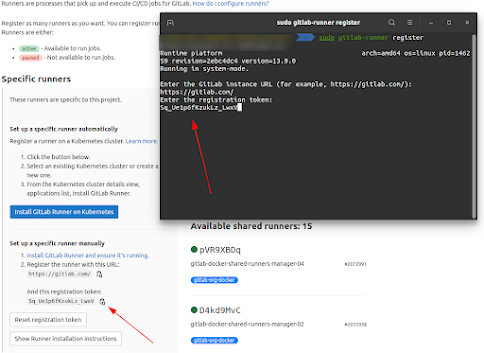
sudo gitlab-runner register

This command will start the process of registering a runner. Then go to the Gitlab Project -Settings->CI/CD->Runners and copy the URL of specific runners.

How to use this specific runner in a pipeline?

Just add the tags field in your pipeline and name the tag which you added during the registration of a runner.
Here is the sample pipeline for your reference.
stage: test
script:
- echo "Testing"
- test -f "build/info.txt"
tags:
- testing
npm:
image: node:latest
stage: npm
How to use this specific runner in a pipeline?
script:
- echo "image pulled"


Monday, July 11, 2022

[Gitlab] gitlab runner doesn`t work on a specific project


Ref: gitlab runner doesn`t work on a specific project

Error:
Fetching changes with git depth set to 50...
fatal: remote origin already exists.
fatal: git fetch-pack: expected shallow list
ERROR: Job failed: exit status 1

Solution:

Centos 7 ships with git version 1.8.3.1 . This version doesn't support commands like git fetch-pack . To fix this problem, you could update git on your server from the IUS repository. update git on Centos 7 to version 2 from third-party IUS repo

$ git --version
git version 1.8.3.1
sudo yum -y install https://packages.endpointdev.com/rhel/7/os/x86_64/endpoint-repo.x86_64.rpm
sudo yum install git


[Gitlab] Install gitlab runner


Ref:https://docs.gitlab.com/runner/install/linux-manually.html

Download

To download the appropriate package for your system:

  1. Find the latest file name and options at https://gitlab-runner-downloads.s3.amazonaws.com/latest/index.html.
  2. Choose a version and download a binary, as described in the documentation for downloading any other tagged releases for bleeding edge GitLab Runner releases.

For example, for Debian or Ubuntu:

curl -LJO "https://gitlab-runner-downloads.s3.amazonaws.com/latest/deb/gitlab-runner_${arch}.deb"

For example, for CentOS or Red Hat Enterprise Linux:

curl -LJO "https://gitlab-runner-downloads.s3.amazonaws.com/latest/rpm/gitlab-runner_${arch}.rpm"

For example, for FIPS compliant GitLab Runner on RHEL:

curl -LJO "https://gitlab-runner-downloads.s3.amazonaws.com/latest/rpm/gitlab-runner_amd64-fips.rpm"

Install

  1. Install the package for your system as follows.

    For example, for Debian or Ubuntu:
    dpkg -i gitlab-runner_<arch>.deb For example, for CentOS or Red Hat Enterprise Linux:
    rpm -i gitlab-runner_<arch>.rpm

  2. Register a runner

Update

Download the latest package for your system then upgrade as follows:

For example, for Debian or Ubuntu:

dpkg -i gitlab-runner_<arch>.deb

For example, for CentOS or Red Hat Enterprise Linux:
rpm -Uvh gitlab-runner_<arch>.rpm

Sunday, July 10, 2022

[Report Server] fully share files

Ref: https://reportserver.net/en/guides/admin/chapters/File-System/

 To fully share files you may place them in a folder where a tick is set at Share folder for web access.


Wednesday, June 29, 2022

GitlabCI run pipeline on specific branch and manual


 Ref: https://stackoverflow.com/questions/51642852/gitlabci-run-pipeline-on-specific-branch-and-manual

You want to run the builds on branch develop automatically but in branch web manually

You can't do this in one build, but you can use two builds for it:

my_build:develop
  stage: build
  only:
    - develop

my_build:web
  stage: build
  only:
    - web
  when: manual

java.desktop/sun.awt.FontConfiguration.getVersion with NullPointerException


 Ref: https://stackoverflow.com/questions/65509533/npe-from-sun-awt-fontconfiguration-getversion-using-apache-fop-jdk-11-on-linux-s

Error:

Caused by: java.lang.NullPointerException
        at java.desktop/sun.awt.FontConfiguration.getVersion(FontConfiguration.java:1262)
        at java.desktop/sun.awt.FontConfiguration.readFontConfigFile(FontConfiguration.java:225)
        at java.desktop/sun.awt.FontConfiguration.init(FontConfiguration.java:107)
        at java.desktop/sun.awt.X11FontManager.createFontConfiguration(X11FontManager.java:719)

Solution:

Turns out the issue was not that I didn't have access to the fonts, the Linux OS required me to install fontconfig via yum.

yum install fontconfig

I am not sure why Oracle JDK 11 plus the missing Linux utility was the issue since this works now in my production environment with Oracle JDK 1.8 and without fontconfig being installed.


Install and use xorg-server on macOS via Homebrew

  The instructions to install and use xorg-server on macOS via Homebrew: Install Homebrew (if you haven't already): /bin/bash -c ...